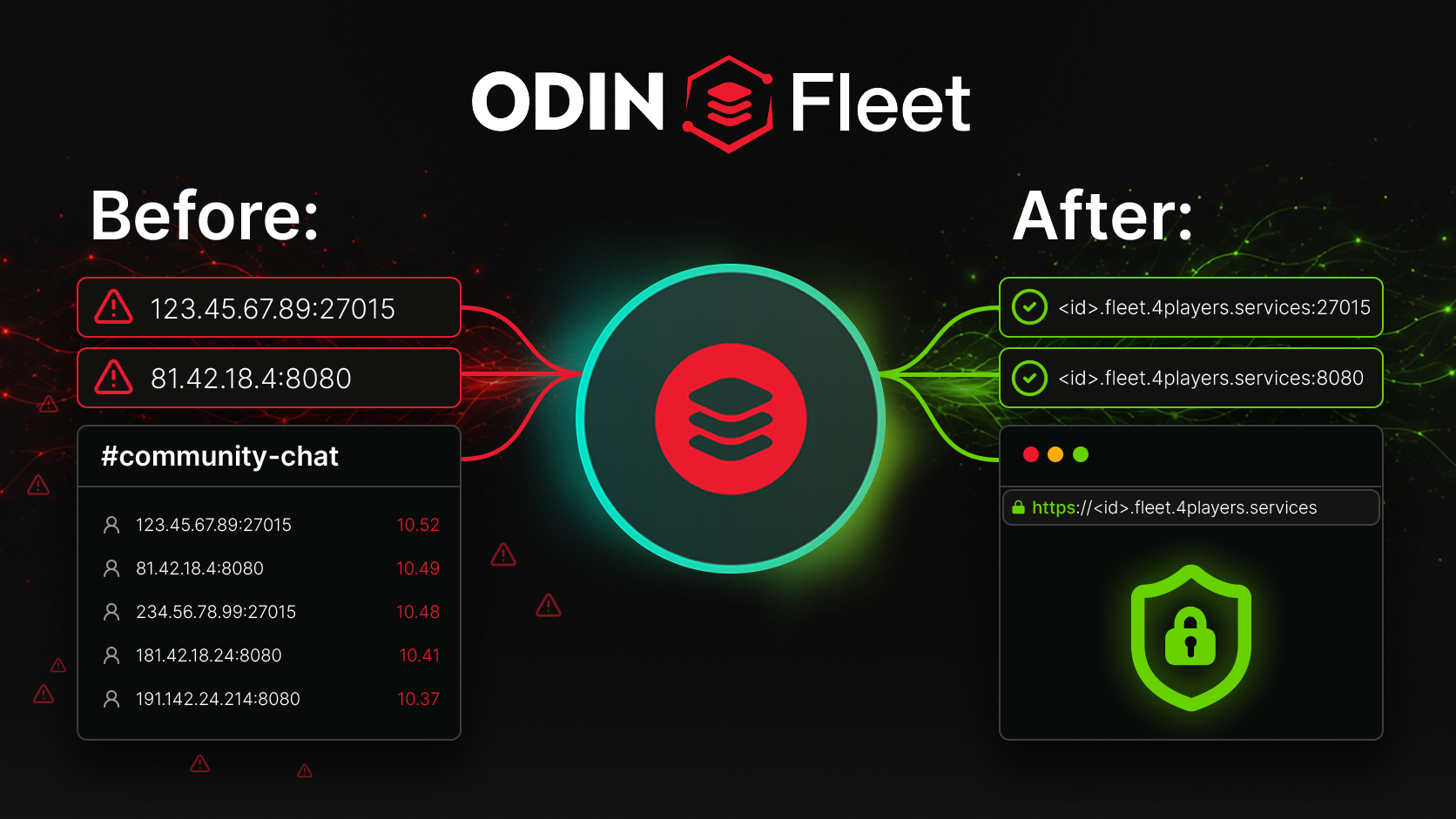
IP port to service link – Fleet DNS enables clear addresses
IP addresses and ports are a nightmare for teams. Players forget the ports, testers share incorrect links, and communities document non-professional addresses. To eliminate this technical hassle, we have integrated DNS into ODIN Fleet. This makes your services easier to access, safer and easier to manage.
Technology holding you back?
Anyone who’s ever wanted to run a game server, a dashboard or an admin panel will be familiar with this: instead of making things easier, technology slows you down. Players, for example, have to memorize IP addresses and ports, or fail to join because they’ve entered the wrong details. To prevent this, communities take it upon themselves to document the addresses on Discord, in launchers or on websites. However, these are so complicated and cumbersome that nobody can really remember them. Even development teams waste valuable time repeatedly answering the same questions: “What was the IP and port again?” or “Why isn’t the link working?”
Technology should work without needing to be constantly explained. It should run in the background whilst users can concentrate on what matters most, whether that’s playing, testing or managing servers.
But more importantly you need secure connections for your users and your team. If anyone who remembers the access to a port or enters by chance the correct number can join, you have clearly a security problem, especially when your connection isn’t secured with the HTTPS standard.
Opening the curtain for Fleet DNS
With Fleet DNS, technical server ports are transformed into simple service addresses. No more chaos of numbers and protocols, just clear links that anyone can share, remember and integrate into workflows. What does this mean in practice? Every access point gets its own, clean address, whether it’s a game port, dashboard or API.
For UDP services, you can now enable Service DNS in the Server Config. This creates a kind of hybrid link with a port, e.g. <id>.fleet.4players.services:27015. Without Service DNS, the UDP port remains accessible only via the traditional IP:port combination. In the case of TCP ports (e.g. web dashboards), the port is omitted entirely: instead of 123.45.67.89:8080, you have addresses such as <id>.fleet.4players.services.
Where Fleet DNS makes the difference
Dashboard
If you run a server and want to share the web dashboard with your team or friends, you’ve currently had to rely on the IP address and port. With Fleet DNS, you simply enable HTTPS DNS for the dashboard port and share a standard link such as https://<id>.fleet.4players.services. This link can be securely opened in the browser straight away, requiring no technical knowledge and triggering no browser warnings. Everyone can access it with a single click, and once bookmarked, it’s easy to come back.
Community servers
A community wants to document its server on Discord, on its website or in the launcher. For TCP ports (e.g. for web services), this results in a clear address without a port number – professional and easy to remember. For game/UDP ports, Service DNS generates a link such as <id>.fleet.4players.services:27015. Both variants are easier to remember than a raw IP address and can be shared in any channel. No guesswork, no need to ask for details, and it just works.
Test server for Teams
Developers, modders and QA teams are all familiar with the problem: test builds need to be shared quickly and easily. Without Fleet DNS, this often involves a back-and-forth exchange of IP addresses and ports that nobody ever manages to keep track of. With Fleet DNS, every test build gets its own address. The web dashboard runs over HTTPS (without a port), the game port is accessible via Service DNS with a port, and everything is ready to use straight away.
But Fleet DNS is more than just a subdomain
Other providers promote ‘free subdomains’ or ‘dedicated IPs’. This is well known and understandable. However, Fleet DNS offers not just a single address for the entire server, but individual addresses for every port and every use case. It is not just a subdomain, rather it is DNS per port, HTTPS for web services and service DNS for UDP ports.
So the most important part here, is that you are making your whole access a lot more secure. Fleet DNS now delivers encrypted connections via SSL which will not only protect your ports even better but will raise trust. Current browsers often warn users when visiting pages without SSL encryption. Fleet DNS has this on board naturally.
If you also want to restrict external access, you can use the Private DNS feature. When activated in the ServerConfig for a port, that port is no longer directly accessible from external IP:Port, but only via the Fleet DNS address. This limits the vulnerability and gives you full power of who can enter. Particularly with HTTPS links, this provides the advantage that communication is encrypted and protected against tampering, which is a crucial difference compared to unencrypted HTTP connections.
Whilst other providers give you subdomains, Fleet DNS gives you control over every service, every port and every use case.
Although Fleet DNS is extremely powerful, there are clear limitations that you should be aware of. For instance, Fleet DNS does not allow you to use your own custom domain, such as my-server.com, nor does it replace authentication or a firewall: whilst private ports reduce the attack surface by preventing direct IP:port access, they do not provide complete protection.
Less technology, more focus on the essentials
But ultimately, the benefits outweigh the drawbacks. Players want to play. Teams want to test. Communities want to grow. Admins want to manage. Nobody wants to mess around with IPs, ports or connection details. Fleet DNS takes that burden off your shoulders.